Skip to content
  • Guide TYPO3
  • Login / Account
  • Functions / Extensions
  • Audio / Video
  • Terms of Use
  • FAQs
  • de
  • en
  • Central Information Technology (TYPO3-Team)
  • IT Service Center (ITSZ)
  • Technical University of Munich
Technical University of Munich
  • Home
  • News from TYPO3 Team
  • Webpool
    • Non-faculty institutions
    • TUM School of CIT
    • TUM School of ED
    • TUM School of LS
    • TUM School of MGT
    • TUM School of MH
    • TUM School of NAT
    • TUM School of SOT
    • TUM Graduate School (GS)
    • Integrative Research Institutes (IRI)
    • Technology Core Facilities (TCF)
    • Corporate Research Centers
    • Munich School of Politics and Public Policy
    • TYPO3 Web-Archive
  • Service
    • Offer
    • Terms of use
    • Requirement
  • Documentation
    • TYPO3 basics
      • Terms
      • Module bar
      • Page tree
      • Filelist
      • Recycler
    • User management
      • Registration and login
      • Permission concept
      • Groupdelegation
    • Pages
      • Page types
      • Create a page
      • Visibility
      • Order pages
      • Delete pages
      • Scheduled publishing
      • Page layout
    • Content elements
      • Page content types
      • Create Page content
      • Headers
      • Text & Media
        • Images
        • Image gallery
        • Slideshow
        • Alternative text for images
        • Image cropping
      • Audio & video
        • Embedding audio files
        • Embedding videos
      • Tables
      • File Links
      • Menu
      • Insert records
      • Rich Text Editor (RTE)
      • Adding links
        • Manage anchors
      • Spacing between content elements
      • Multi-column content
      • Accordion Functionality
      • Frames & Boxes
      • Social Media Box
    • Extensions
      • CurlContent
      • TUM MemberList
      • TUMcourses
      • TUMvCard
      • News
      • TUMFIS
      • T3UP Carousel
      • iframe with consent
    • English version
    • Contact area
    • Accessible content
    • Legal matters
    • Maps
      • Maps with Google Maps
      • Maps with BayernAtlas
  • FAQs
  • Contact
  • Sitemap
  1. Home
  2. Documentation
  3. Content elements
  4. Page content types

Page content types

Content elements are structured into various groups, with specific types assigned to each group. Depending on the type, you have different design options in a content element.
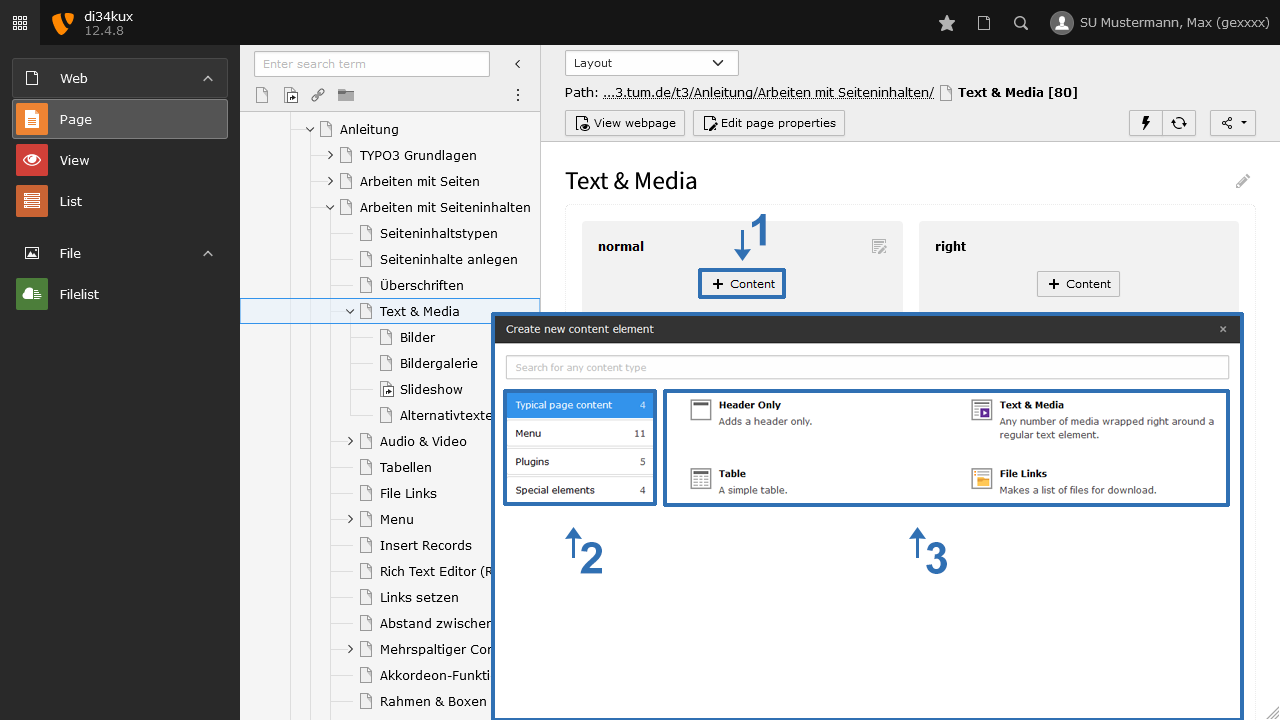
Image: Page content types

You determine the type of content element during setup (see image). The content element type can also be changed later. Below, each “type” is described according to its group.

Standard

  • Content element type “Header”: A heading with a text field.
  • Content element type “Text & Media”: A heading with a text field. Here, you can add text as well as files. The text can be entered and formatted using the Rich Text Editor. You can create links, create tables, and embed files under “Media” (image and audio files, videos, or PDFs). Including videos from YouTube or Vimeo is also part of this.

Lists

  • Content element type “Table”:
    With the table wizard, you can create tables.
    Preferably, use the table in the RTE (Rich Text Editor) and less the content element Table.
  • Content element type “File Links”:
    Links to PDF files with the option to customise their appearance.
    You can find a guide for "File Links" on a separate page.

Menu

Creating link lists on internal pages, such as sitemaps, section indexes (anchors), link lists of subpage trees, etc.
You can find a guide for the various menus on a separate page.

Special

  • Content element type “Insert Records”:
    If you want to display the same content element on multiple pages, you can reference it.
    You can find out how to do this on the page “Insert Records.”
  • Content element type “Insert Plugin”:
    With plugins, you can insert content provided by extensions. These include:
    • TUMvCard
    • TUM MemberList
    • TUMcourses
    • CurlContent
    • News
  • Content element type "Divider":
    This is used to create a horizontal line (e.g., a separator between two content elements).
  • Content element type “iFrame with consent”:
    This allows you to integrate content from external sources, such as maps or program brochures, via iframe.
  • Content element type “Carousel”:
    This is used to create a slideshow.
To top

TYPO3 News

14.04.2026

TUMFIS is now available (Open Beta)

23.03.2026

Structured Data and JSON‑LD available

25.02.2026

New functions: Image cropping and Anchor links

21.01.2026

New Security Concept - User Accounts

01.08.2025

We are in OTRS!

RSS Feed

TUM TYPO3 (ZIT)

Richard-Wagner-Str. 18
80333 München
typo3@tum.de

  • Privacy
  • Imprint
  • Accessibility