Skip to content
  • Anleitung TYPO3
  • Login / Account
  • Funktionen / Extensions
  • Audio / Video
  • Dig. Barrierefreiheit
  • Nutzungsbedingungen
  • FAQ
  • de
  • en
  • Central Information Technology (TYPO3-Team)
  • IT Service Center (ITSZ)
  • Technical University of Munich
Technical University of Munich
  • Startseite
  • Webauftritte
    • Nichtfakultäre Einrichtungen
    • TUM School of CIT
    • TUM School of ED
    • TUM School of LS
    • TUM School of MGT
    • TUM School of MH
    • TUM School of NAT
    • TUM School of SOT
    • TUM Graduate School (GS)
    • Integrative Research Institutes (IRI)
    • Technology Core Facilities (TCF)
    • Wissenschaftliche Zentralinstitute (WZI)
    • Hochschule für Politik
    • TYPO3 Web-Archiv
  • Service
    • Scope
    • Terms of Use
    • Requirement
  • Documentation
    • TYPO3 Basics
      • Terms
      • Module bar
      • Side tree
      • Filelist
      • Registration and login to the backend
      • Permissions concept
        • Groupdelegation
    • Working with Pages
      • Page types
      • Create a page
      • Hide/show pages
      • Sort/copy pages
      • Delete pages
      • Scheduled publishing
      • Change page layout
    • Working with Page content
      • Page Content types
      • Create Page content
      • Headers
      • Text & Media
        • Images
        • Image gallery
        • Slideshow
        • Alternative text for images
      • Audio & Video
        • Embed audio files
        • Embed video
      • Tables
      • File Links
      • Menu
      • Insert Records
      • Rich Text Editor (RTE)
      • Links setzen
      • Spacing between Content elements
      • Multi-column Content
      • Accordion Functionality
      • Frames & Boxes
      • Social Media Box
    • Extensions
      • CurlContent
      • TUM MemberList
      • TUMcourses
      • TUMvCard
      • News
      • iFrame with consent
      • T3UP Carousel
    • English Version
    • Contact Area
    • Legal Matters
    • Maps
      • Maps with Google Maps
      • Maps with BayernAtlas
  • Digital Accessibility
    • Quick Start for Editors
    • Leichte Sprache
  • FAQs
  • Contact
  • Sitemap
  1. Startseite
  2. Documentation
  3. Working with Page content
  4. Social Media Box

Social Media Box

The Social Media Box is specifically designed for the right column to link your social channels (Facebook, X (Twitter), YouTube, Instagram, LinkedIn, and Bluesky) with their respective icons.

Create a "Text & Media" Content Element
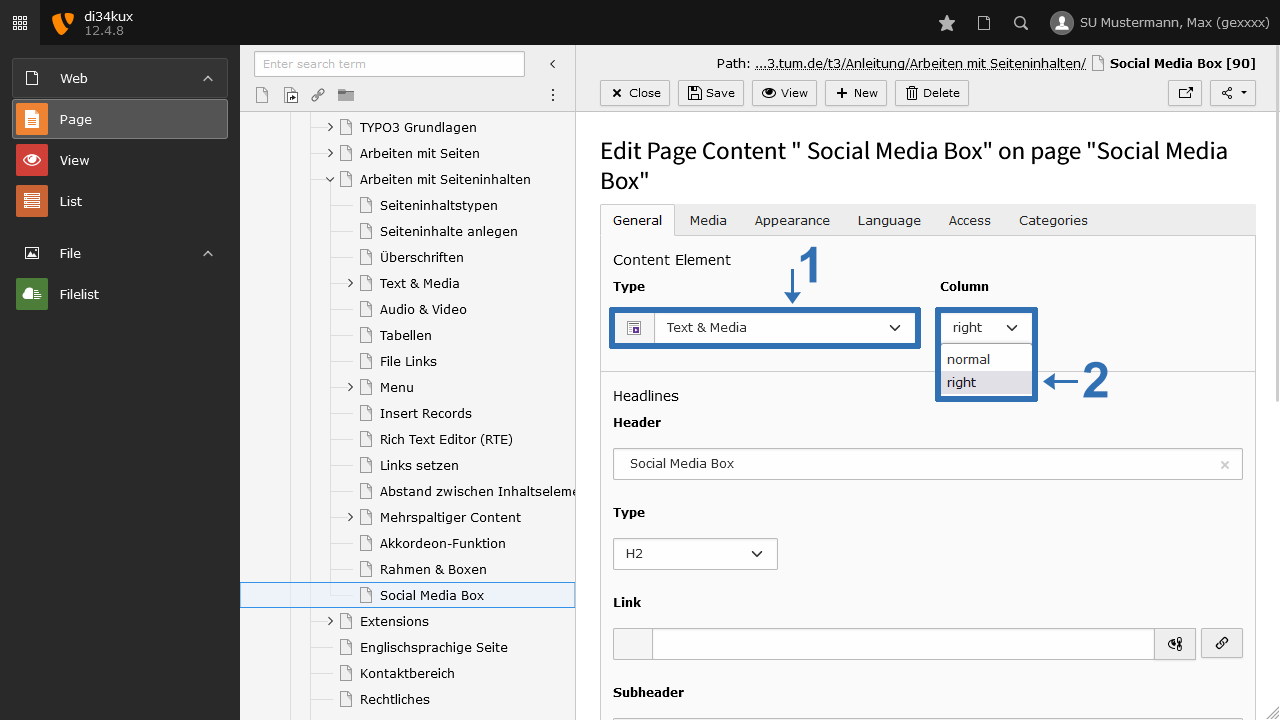
Screenshot: Create a Text & Media Element
Image 1: Create a Text & Media Element
  • Create a new content element of the type "Text & Media" (Image 1 No.1).  
  • Select "right" under Column (Image 1 No.2).

Linking the Social Media Accounts

  • Enter the desired social media channels (Facebook, X (Twitter), YouTube, Instagram, LinkedIn, or Bluesky) in the RTE (Rich Text Editor) (Image 2 No.1). You can also arrange them one below the other temporarily for easier individual editing. Link them to your social media accounts (Image 2 No.2-4).  
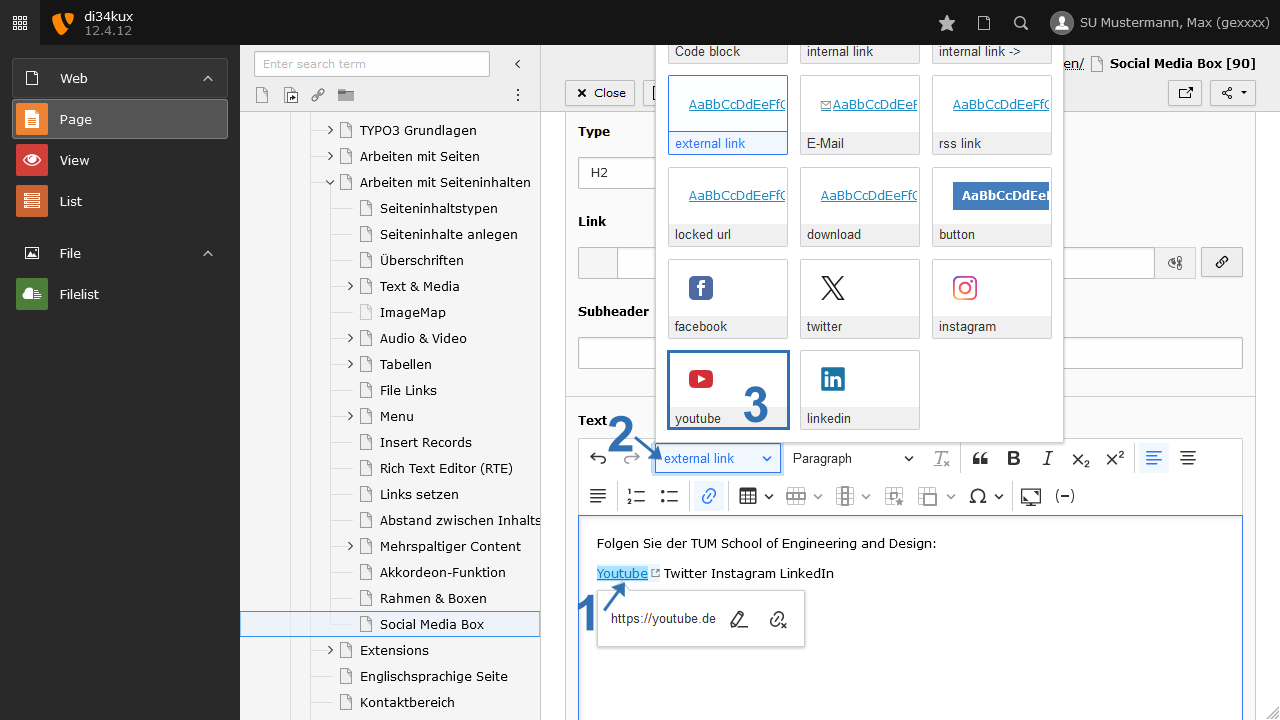
  • Click on the linked text section (Image 3 No.1).
  • In the menu bar of the RTE, select the respective entry under Styles, e.g., YouTube (Image 3 No. 2&3). Be sure to uncheck the automatically set style “external link.” The text will then be replaced by the logo in the RTE.  
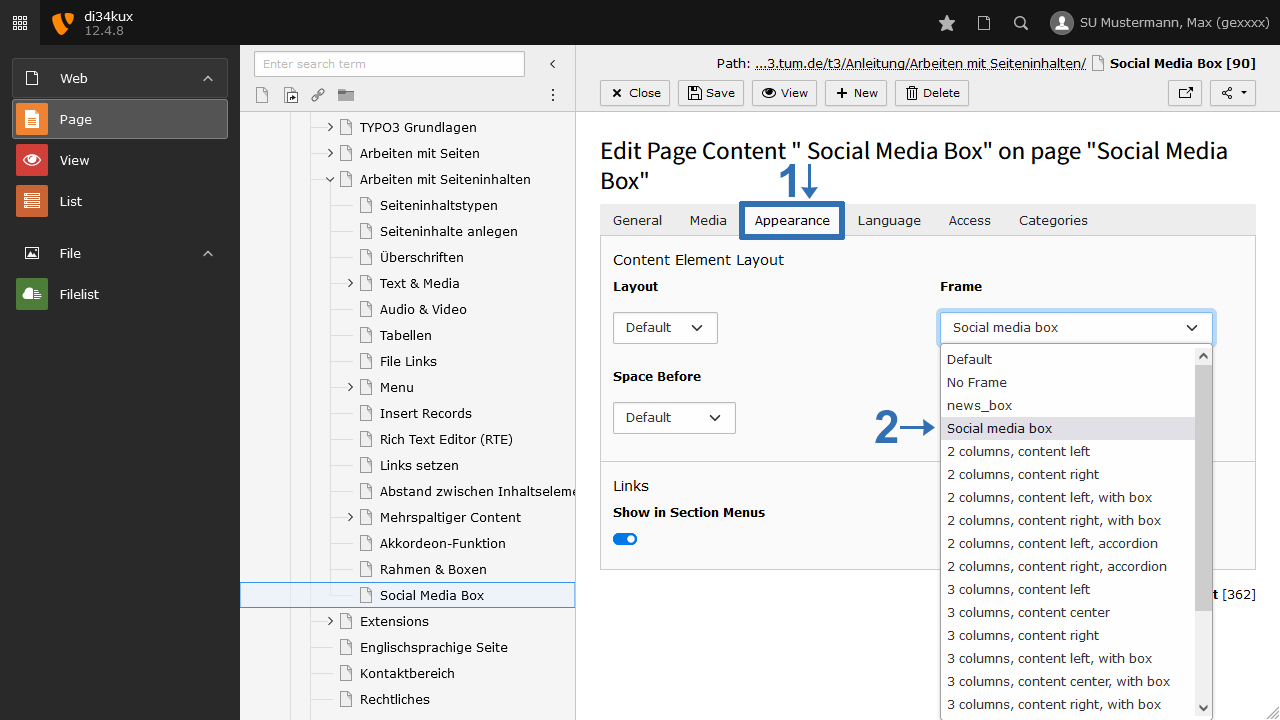
  • If you also want to include the general social media accounts of TUM (Technical University of Munich), select "Social media box" under the Appearance tab in the Frame section (Image 4). This setting will automatically add the black icons for LinkedIn, Instagram, Bluesky, Facebook, YouTube, and X (Twitter), along with links to TUM's social media channels.
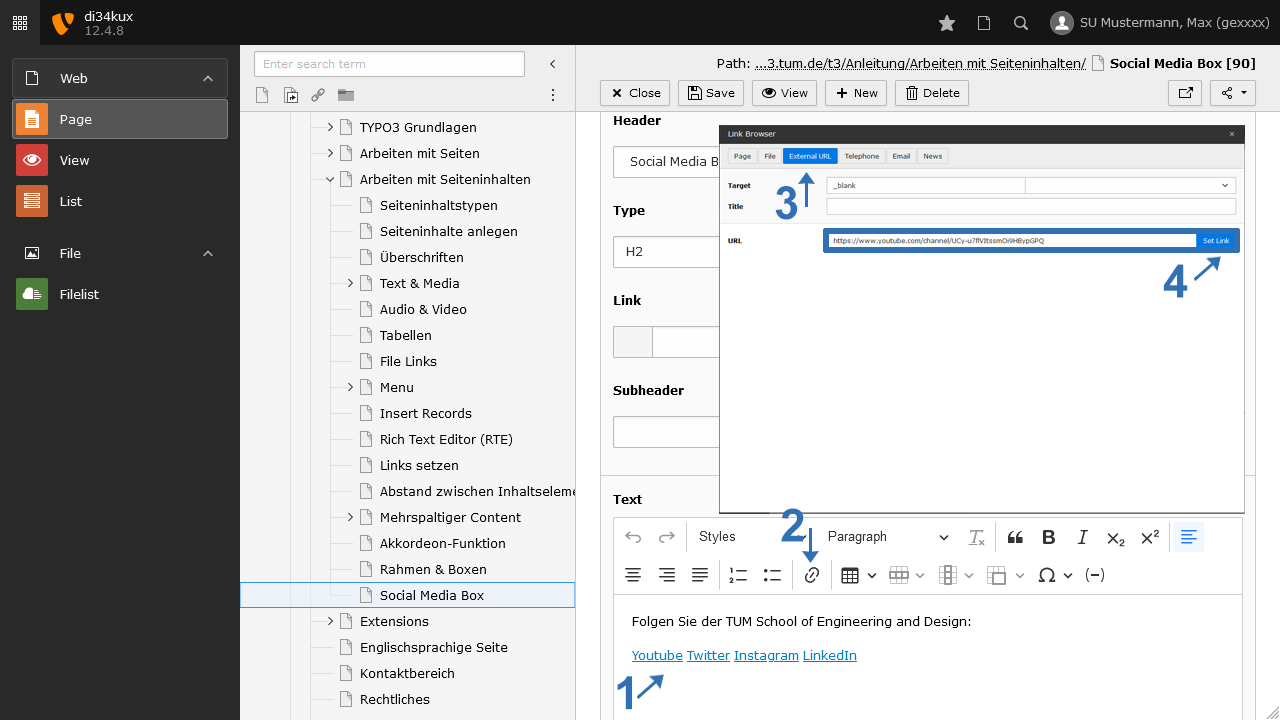
Screenshot: Linking in the RTE
Image 2: Linking in the RTE
Screenshot: Formatting Links
Image 3: Formatting Links
Screenshot: Select "Social media box"
Image 4: Select "Social media box"
To top

TUM TYPO3 (ZIT)

Technical University
of Munich

Richard-Wagner-Str. 18
80333 München
typo3(at)tum.de

Information

We are utilizing the OTRS system for our support services. Your support requests will be processed as tickets, in a manner similar to what you may be accustomed to from the IT support. We encourage you to continue communicating with us via email at typo3(at)tum.de.

Membership

TYPO3 Academic Gold Member

Social Media Box

Youtube Twitter Instagram LinkedIn Bluesky

Follow TUM:
  • Privacy
  • Imprint
  • Accessibility